AI search
AI Overviews: what it takes for your store to be cited in Google AI Overviews
On this page 13
- What AI Overviews are, and what they are not
- How Google AI Overviews build an answer
- What 30 shopper searches show about who gets cited
- The five-question check: is your store eligible today?
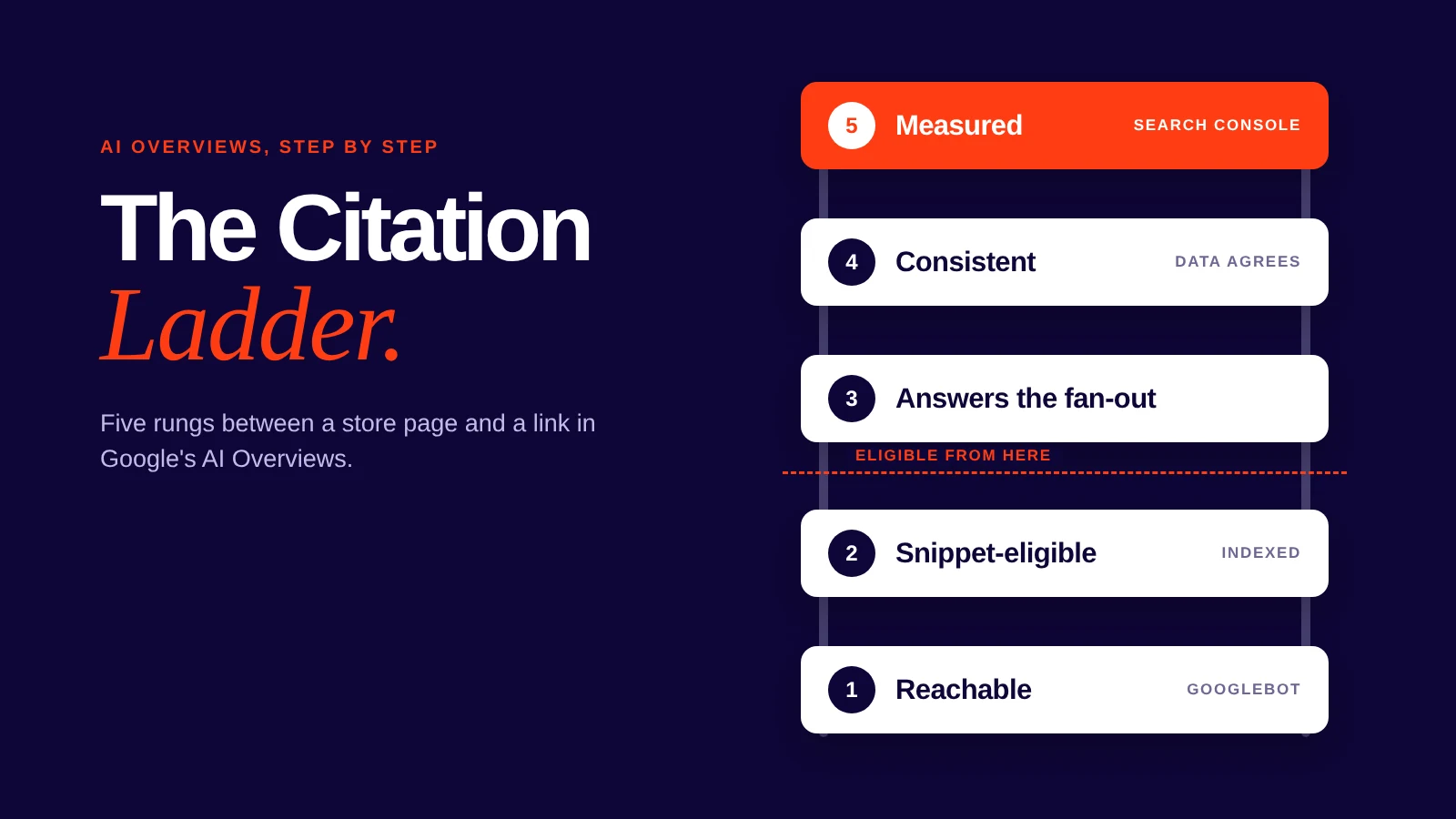
- The Citation Ladder: five rungs between your page and an AI Overview
- How to limit what AI Overviews show from your site
- What AI Overviews do not change
- Can you turn AI Overviews off?
- Four stores, four different first moves
- How Uruora handles AI search for a store
- Sources and methodology
- The bottom line
- Check the rungs a crawler sees first
A shopper types "best linen sheets for hot sleepers" into Google. Before any store link loads, a block of text at the top answers the question, names a few brands and links three or four pages. Your store sells exactly those sheets. It isn't in the block, and nothing in your analytics tells you why.
That block is an AI Overview. Google publishes the conditions a page must meet to be eligible for one. It doesn't publish how it chooses among the pages that meet them, which is why the conditions are the place to start.
If your products or articles never appear in AI Overviews - start with the five-question check below.
If you want to stop your content appearing in them - go to "How to limit what AI Overviews show from your site".
If you only want them off your own screen - go to "Can you turn AI Overviews off?".
If traffic changed and you want to know whether AI Overviews caused it - go to Rung 5 of the ladder.
If you sell products and want to know who gets cited today - go to "What 30 shopper searches show".
What AI Overviews are, and what they are not
Google runs several AI features, and each one has its own controls and its own reporting. Treating them as one thing is how stores end up blocking the wrong crawler or chasing the wrong report.
| AI Overviews | AI Mode | Classic web results | Gemini apps and Vertex AI grounding | |
|---|---|---|---|---|
| What it is | An AI summary at the top of a results page, with links to supporting pages | A conversational AI response for exploration, reasoning and comparisons, with links | The ranked list of web pages | Google's AI assistant and developer platform, outside Search |
| When it shows | Only when Google's systems judge it adds something to classic results | When the searcher opens AI Mode | Alongside or instead of AI features | When someone uses those products |
| How a page qualifies | Indexed and eligible to show with a snippet | Same as AI Overviews | Indexed | Separate from Search |
| What controls it | Googlebot in robots.txt, plus nosnippet, data-nosnippet, max-snippet, noindex | Same as AI Overviews | Same Search controls | The Google-Extended token in robots.txt |
| Where you measure it | Search Console Performance report, "Web" search type | Search Console, same report | Search Console | Not covered by Search Console's documentation |
The last column is where most mistakes start. Google-Extended controls whether Google uses your content to train Gemini models and to ground answers in the Gemini apps and Vertex AI. It is a separate decision from Search.
How Google AI Overviews build an answer
Google describes the mechanism in its Search Central guide to AI features. AI Overviews and AI Mode can use a technique called query fan-out. Behind the scenes, Google runs multiple related searches across subtopics and data sources, then builds one response and links the pages that support it.
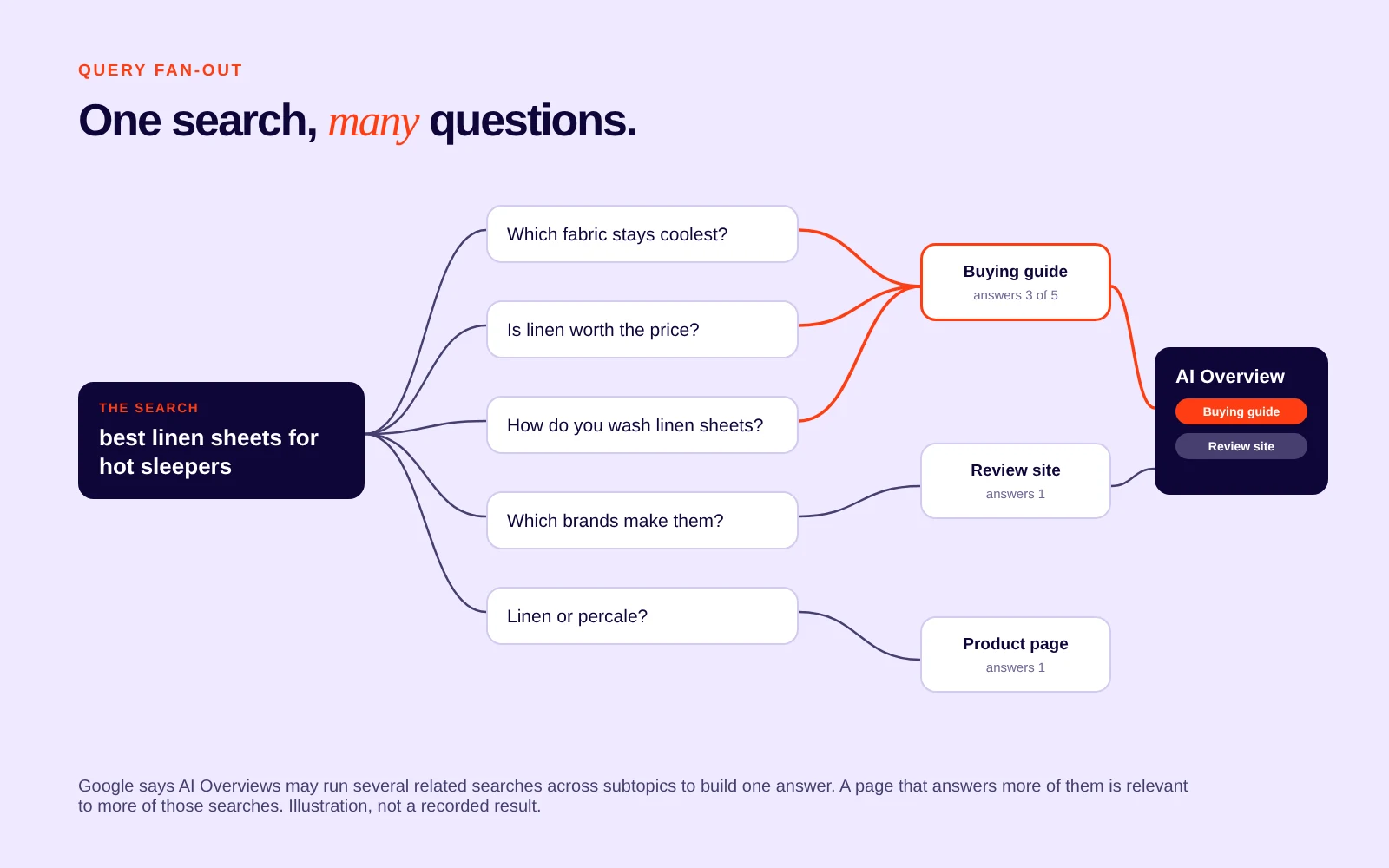
The searcher typed one query. Google may have answered four or five. "Best linen sheets for hot sleepers" can fan out into questions about breathability, thread count, washing, price and which brands make them. The practical reading: a page that answers only the main question is relevant to one of those searches. A page that answers the subquestions is relevant to several.
- AI Overviews often don't appear. Google shows one only when its systems determine it adds something beyond classic results. For many queries, the plain list of links is the whole page.
- There is no separate entry ticket. To be eligible as a supporting link, a page must be indexed and eligible to show in Search with a snippet.
So the question isn't "how do we optimize for AI Overviews?" It's "which of the ordinary requirements is this page failing?"
What 30 shopper searches show about who gets cited
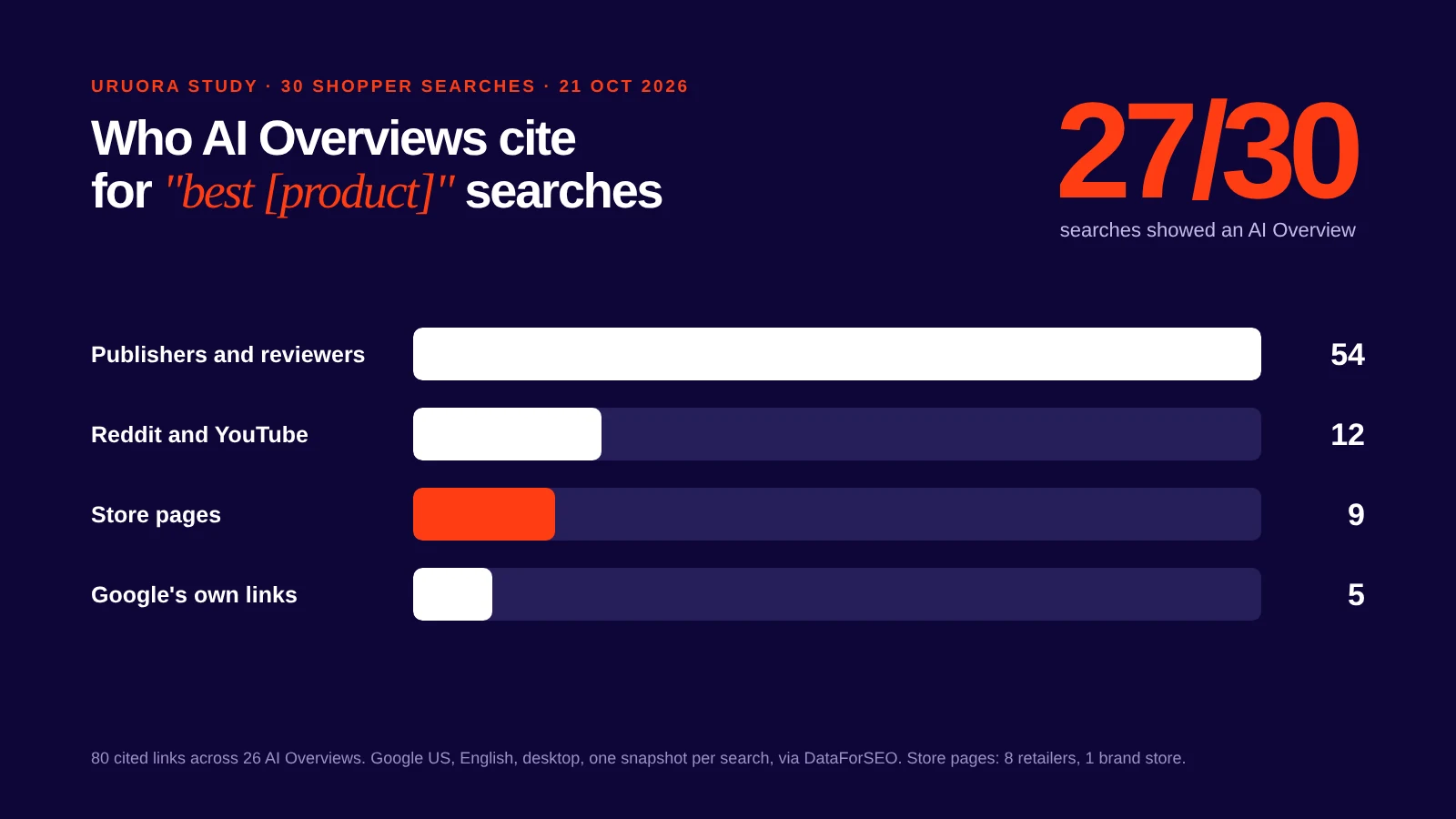
Uruora ran 30 "best [product]" searches through Google on 21 October 2026: home, beauty, fashion, food, pets, baby and gifts, each with 8,100 to 74,000 US searches a month. The results, one US desktop snapshot:
| What we counted | Result |
|---|---|
| Searches that showed an AI Overview | 27 of 30 |
| Cited links captured (26 overviews) | 80 |
| Cited links from publishers and review sites | 54 (68%) |
| Cited links from Reddit or YouTube | 12, across 10 searches |
| Cited links from store pages | 9 (8 retailers, 1 brand store) |
| Most-cited single site | nytimes.com (Wirecutter), 11 of 80 |
| Searches where a store page ranked in the organic top 10 | 22 of 30 |
| Cited links that were not in the organic top 10 | 38 of 75 |
Three things stand out for a store owner:
- Buying questions get answered by reviewers, not sellers. Stores ranked in the top 10 for 22 of the 30 searches but were cited in only 9 overviews. The one independent brand cited was Summersalt, whose swimwear collection page appeared for "best swimsuits for women".
- The store pages that did get cited compare or curate. Ulta's discover page, Dermstore's buying guide, Nordstrom's best-seller list and Amazon's best-seller lists made it in. Single product pages didn't.
- A top-10 ranking isn't the whole story. Half the cited links weren't in the organic top 10 for that search, which fits Google's description of fan-out searches pulling in pages from related queries.
For a store, that points to three routes into an AI Overview: get your products into the reviews and threads Google already cites, publish your own comparison and buying-guide pages, and keep product data clean for the shopping blocks that appear alongside the overview (Popular Products showed on 23 of the 30 searches).
The five-question check: is your store eligible today?
Run these five checks on your three most important pages: usually your homepage, your best-selling product or collection, and your most-read article.
- Search your buyers' questions. In a private browser window, search five questions your customers ask before they buy. Note whether an AI Overview appears and which sites it links. If one appears and links your competitors, the query is open to you.
- Open your robots.txt. Go to yourstore.com/robots.txt. Look for a
Disallowrule that covers your product, collection or blog paths forGooglebotor for every crawler (User-agent: *). - Inspect the URL in Search Console. Use the URL Inspection tool on each page. Confirm it is indexed. If it isn't, nothing else on this list matters yet.
- Search the page source for preview controls. Look for
nosnippet,max-snippetandnoindexin the meta tags, anddata-nosnippeton the elements that hold your main content. Any of them limits what Google can show from the page. - Open the Search Console Performance report. Leave the search type on "Web". Filter queries that contain "how", "best", "what" or "vs". Google describes AI Overviews as a way to get to the gist of a complicated topic or question, so question-style queries are where to look first.
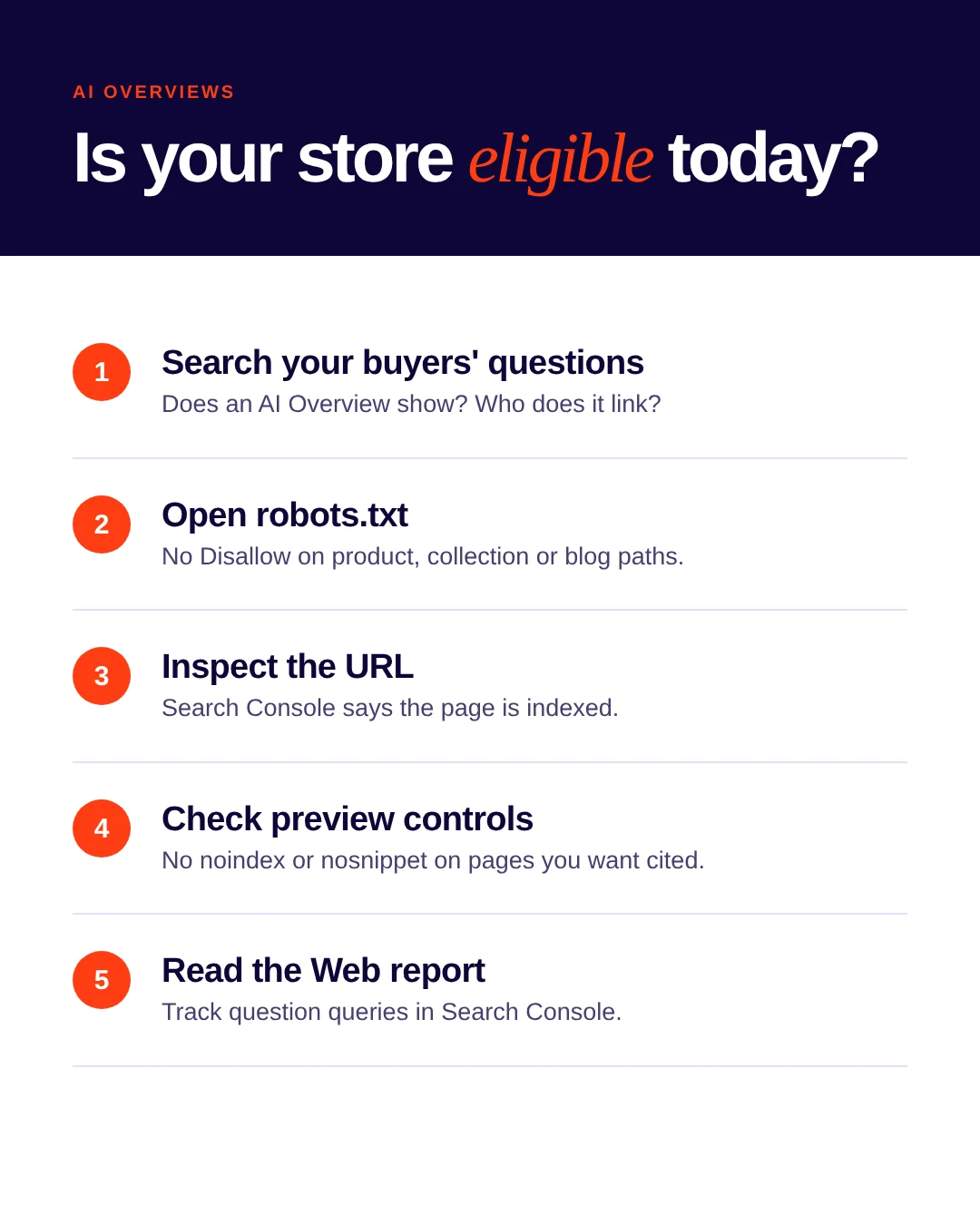
Four findings block a page outright: a Disallow rule covering it for Googlebot, a page that isn't indexed, noindex, or nosnippet. Fix those before any content work. A max-snippet limit or data-nosnippet doesn't block the page, but it limits what Google can quote from it.
The Citation Ladder: five rungs between your page and an AI Overview
Google's published practices for AI features sort onto five rungs. Rungs 1 and 2 decide eligibility. Rungs 3 to 5 don't make a page eligible; they improve its odds and show whether it is working. Each rung depends on the one below it. A brilliant buying guide on a page Googlebot can't crawl is invisible.
Rung 1: Reachable
Google lists "ensuring that crawling is allowed in robots.txt, and by any CDN or hosting infrastructure" first among its practices for AI features. Its May 2025 guidance adds two basics: Googlebot isn't blocked, and the page returns an HTTP 200 status.
Bot protection, firewall rules and rate limits at the hosting layer can turn crawlers away even when robots.txt allows them. Search Console's URL Inspection shows the HTML Googlebot received. If that HTML is a challenge page or an error, the page is unreachable, whatever robots.txt says.
Google's list also includes two site-wide basics that sit on this rung: important pages reachable through internal links, and a good page experience across devices.
What to fix: remove Disallow rules on revenue pages, check the CDN or bot-protection settings for Google's crawlers, fix any page that doesn't return 200, and link your key product and guide pages from navigation or collections.
Rung 2: Indexed and snippet-eligible
This is the eligibility line. A page needs to be indexed and allowed to show a snippet. Google's snippet controls decide how much it may show:
noindexremoves the page from Search entirely.nosnippetstops any snippet, and with it the page's text in AI features.max-snippet:[number]caps how much text Google can show.data-nosnippethides specific elements on the page.
These controls can end up in themes, apps and SEO plugins without anyone deciding to add them. A data-nosnippet wrapped around a product description, or a low max-snippet value set years ago, quietly caps what Google can quote.
What to fix: remove preview controls from the pages you want cited, then use URL Inspection to confirm Googlebot sees the change. Google notes that recrawling can take anywhere from days to months. You can request a recrawl.
Rung 3: Answers the fan-out
Google's guidance asks for "unique, non-commodity content" and notes that people now ask "longer and more specific questions", plus follow-up questions.
For a store, a page that repeats the manufacturer's description is commodity content. So is a blog post that says what every other result says. Pages that answer the fan-out:
- state the answer to the main question in the first lines of the section
- cover the subquestions a buyer asks next (fit, materials, care, comparisons, who it isn't for)
- put important information in text, not only inside images (Google lists "making sure that important content is available in textual form")
- support the text with high-quality images and video where they help the buyer decide
- for buying questions, add comparison and buying-guide pages, the kind of store page that got cited in the 30-search study above
What to fix: list the five to ten questions that follow your main query. Use People Also Ask, your support inbox and your reviews. Make sure one page on your site answers each one in plain text.
Rung 4: Consistent everywhere Google looks
AI responses draw on more than one data source. Google tells site owners to make sure structured data matches the visible text on the page, and to keep Merchant Center and Business Profile information up to date.
For a store, that means three checks:
- The price, availability and brand in your Product structured data match what the page shows.
- Your Merchant Center product data matches the site. Merchant Center is free, and Shopify can link to it and sync products automatically. A WooCommerce or other store can let Merchant Center read product information from the site at sign-up, or upload product data.
- Your Business Profile hours, address and categories are current, if you sell from a physical location.
What to fix: run a schema check on a sample of product pages, and compare a handful of products across the page, the structured data and Merchant Center.
Rung 5: Measured the way Google counts it
Search Console doesn't have a separate AI Overviews report. Google reports clicks and impressions from AI Overviews and AI Mode inside the Performance report, under the "Web" search type, together with classic results. A few counting rules from Search Console's documentation change how the numbers read:
- A click on an external link in an AI Overview counts as a click.
- An AI Overview occupies one position, and every link inside it gets that same position. A page cited third in the overview and a page cited first report the same position.
- In AI Mode, a follow-up question counts as a new query.
Google also states that clicks from results pages with AI Overviews are "higher quality", with users more likely to spend more time on the site. It recommends judging visits by conversions (sales, signups, engagement) rather than clicks alone.
What to measure: in Search Console, track impressions and clicks for question-style queries month over month. In your analytics, track the conversion rate and time on site for Google organic visitors. Report both. Clicks alone will undersell the channel or oversell it.
How to limit what AI Overviews show from your site
Some stores want the opposite: to keep certain content out of AI answers. Google's controls work page by page and element by element:
- Keep a page out of Search entirely:
noindex. It also leaves AI Overviews. - Keep a page in Search but show no text from it:
nosnippet. - Show only a short excerpt:
max-snippet:[number]. - Hide specific sections, such as wholesale pricing or a recipe step:
data-nosnippeton those elements.
Google's May 2025 guidance names the trade-off: more restrictive settings limit how the content is featured in AI experiences. If a page still appears after a change, Google's troubleshooting steps are to confirm the control is visible to Googlebot in URL Inspection, then allow time for recrawling.
What AI Overviews do not change
- No special markup, file or tag. Google states there are no additional technical requirements for AI features, and llms.txt is not among its requirements for AI Overviews.
- No separate content. The same page serves classic results and AI Overviews. Writing a second version "for AI" is not part of Google's guidance.
- Not every query. AI Overviews often don't trigger. A drop in clicks on a query that never shows one has another cause.
Can you turn AI Overviews off?
Not as a searcher. Google's Search Help describes AI Overviews as a core Search feature, like knowledge panels, and says features can't be turned off. After searching, the Web filter shows text-based links only, without AI Overviews. Turning off "AI in Search" in Search Labs only removes the experimental features from Labs.
For a site owner, the controls above are the off switch: they limit what Google shows from your pages, not whether AI Overviews appear for a query.
Four stores, four different first moves
A Shopify store that sells well on Google Shopping but never appears in AI Overviews. Start at Rung 3. Product pages built from supplier descriptions are commodity content. Add the sizing, care and comparison answers your support team gives every week, build one buying guide for your main category, then confirm Merchant Center syncs the same prices the pages show. Getting the products into the review sites and forums that already appear for your category is the second route.
A boutique with a physical shop and local customers. Start at Rung 4. Google lists an up-to-date Business Profile among its practices for AI features. Make the opening hours, address and categories match the website before working on content.
A brand whose blog impressions are rising while clicks stay flat. Start at Rung 5. Check whether the growth is on question queries, then judge those visits by conversions, not clicks.
A store that switched on aggressive bot protection after a scraping problem. Start at Rung 1. Check URL Inspection on a product page. If Googlebot receives a challenge page, the store is unreachable for AI Overviews and classic results at the same time.
How Uruora handles AI search for a store
For the wider picture beyond Google, see what GEO is.
Uruora's AI search specialist checks which of 8 AI crawlers a store's robots.txt lets in. It puts buyers' questions to Perplexity and shows whether the answer names the store or its competitors. It then writes FAQ blocks, an about paragraph, robots.txt lines and an llms.txt file for the owner to approve.
The SEO specialist works on the Google side of the ladder. It checks up to 12 pages and the full catalog for titles, descriptions, headings, image text, product markup, canonicals and sitemap, and runs Google's mobile speed test. With Search Console connected, the AI CMO compares this week with last week.
Sources and methodology
- Google Search Central, AI features and your website (page last updated 10 December 2025)
- Google Search Central Blog, Top ways to ensure your content performs well in Google's AI experiences on Search, 21 May 2025
- Search Console Help, What are impressions, position, and clicks?
- Google Search Help, AI Overviews in Google Search
- Google Search Central, Google's common crawlers: Google-Extended
- Google Search Central, Control your snippets in search results
- Google Merchant Center Help, Get started with Merchant Center
- Uruora study, 21 October 2026: 30 "best [product]" searches, Google US, English, desktop, one snapshot per search, collected through the DataForSEO SERP API with AI Overviews loaded. Citations are the source links returned with each overview. Search volumes from DataForSEO Labs. AI Overviews vary by date, location, device and account.
- Google, Generative AI in Search, 14 May 2024
Last reviewed: 21 October 2026.
The bottom line
Google AI Overviews cite pages from Google's ordinary index. There is no separate door. A page qualifies when Googlebot can reach it and it is indexed and allowed to show a snippet. It earns citations by answering the questions around the query and keeping its data consistent everywhere Google looks. Search Console then shows whether it is working. Start at the bottom rung. The first two are the cheapest to fix, and nothing above them counts until they pass.
Check the rungs a crawler sees first
Rungs 1 and 4 are the ones a crawler sees before anything else: whether it is let in, and whether your product markup says what the page says. Uruora's free plan includes the SEO specialist, which checks up to 12 pages and your catalog for titles, headings, image text, product markup, canonicals and sitemap. It also includes the AI search specialist, which shows which of 8 AI crawlers your robots.txt lets in.